Increase one input coordinate to a linear layer by , keeping everything else fixed. The output changes by exactly one column of the weight matrix.
That column is sitting there in plain sight. But if you learned matrix multiplication as “take a row, take a column, multiply and add,” it is surprisingly easy to miss.
Once you see it, you can read off what each input contributes—and what changing a weight will do.
How one input changes both outputs
Take a layer with two inputs and two outputs:
The input values are ; contains the outputs. Feed in and you get .
Increase only by one. The input becomes and the output becomes :
There is the first column: . Increase instead, and the output changes by , the second column.
The starting point doesn’t matter. In (1), every extra unit of adds to the first output and to the second, whatever values the inputs already have.
Building an output by combining columns
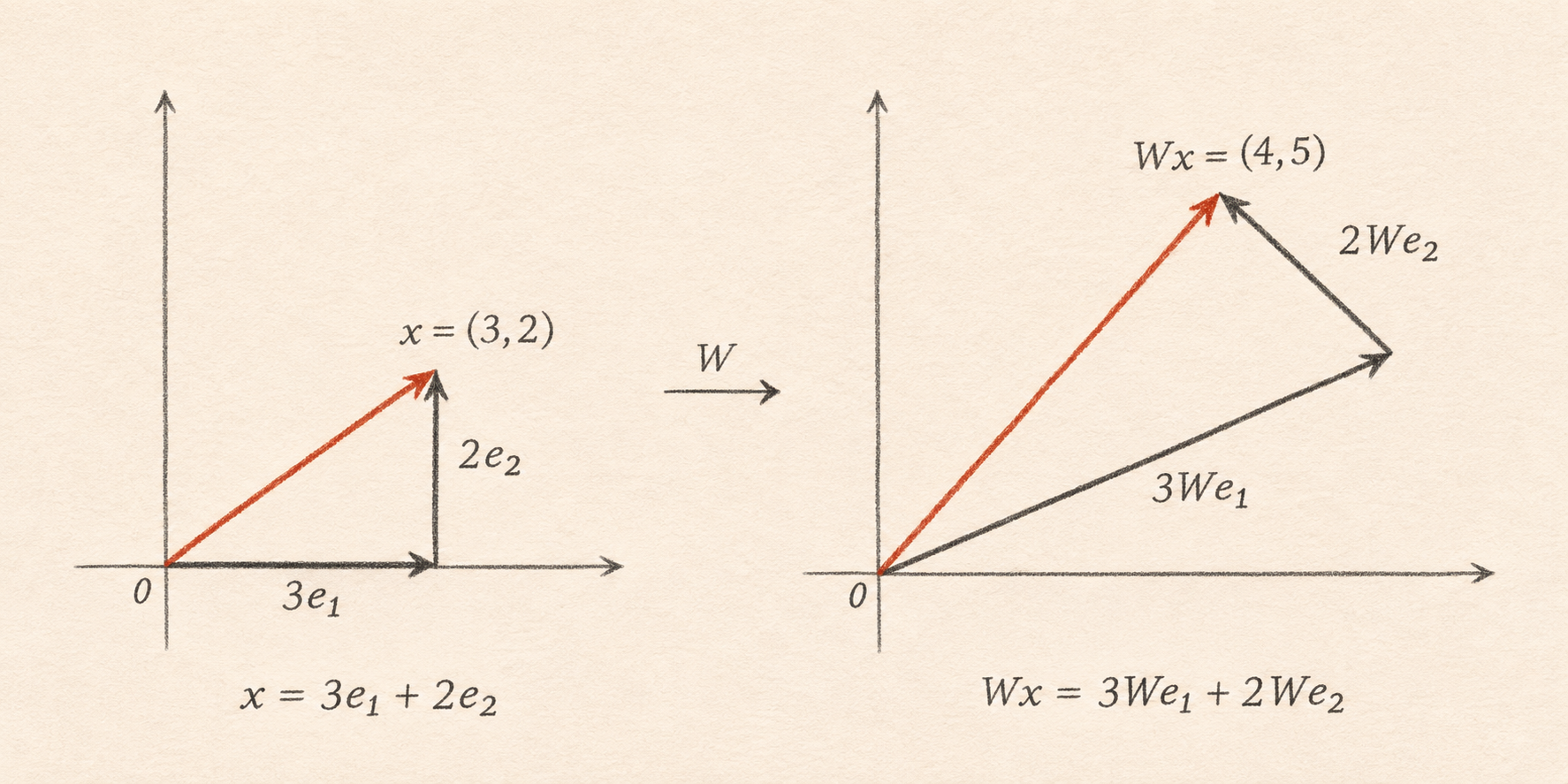
Start from zero and build the input one coordinate at a time. The output accumulates three copies of the first column and two of the second:
The input supplies the coefficients; the matrix supplies the vectors being combined. Negative coefficients subtract; fractional ones take part of a column.
Draw as an arrow from the origin. The same recipe builds it from horizontal and vertical unit arrows:
These arrows form the standard basis of the plane: every vector has exactly one expression as their linear combination. They reach the whole plane (spanning), and neither direction is redundant (linear independence).
Multiplying by moves the two basis arrows to the two columns, keeping the recipe intact:
Preserving linear combinations is what makes this a linear map. For any vectors and real numbers , .
Our four weights specify just two destinations. Because every input is built from the same two basis arrows, linearity fixes the rest of the plane’s destinations too.
What the rows and columns control
A layer with input coordinates and output coordinates works the same way. Its weight matrix has columns, each with entries. Calling those columns , we have
Change by and the output changes by . One column gives the response across all outputs.
To calculate just one output, read across its row:
Here is the weight in row , column . Rows collect inputs into an output; columns carry an input’s contribution to the outputs.
A bias in shifts the output by a fixed amount. It leaves these responses unchanged. A nonlinear activation can change them, so this describes the computation before that activation.
What happens when a weight changes
Now let training change the top-left weight in (1) from to , leaving the others fixed. For a fixed input, the output changes by
For , the change is . If , it does nothing. The same weight edit has a different effect depending on the input passing through it.
Editing a whole column changes how one input coordinate contributes across the outputs. Geometrically, training moves the destinations of the basis arrows; each input still supplies its own combination coefficients.